WordPress powers a significant portion of the modern web, which naturally makes it a high-value target for attackers. E-commerce sites are often targeted for financial gain, while other WordPress installations are abused to distribute malware, phishing pages, or spam.
Attackers are motivated in different ways, but the underlying issue is usually the same: poor hardening and excessive reliance on insecure plugins. This guide focuses on practical WordPress hardening techniques that significantly reduce attack surface, without turning your site into a plugin graveyard.
Choose Themes and Plugins Carefully
WordPress owes much of its popularity to its extensibility. Unfortunately, this is also one of its biggest weaknesses. Many compromises originate from poorly maintained or insecure plugins and themes. Installing a theme or plugin effectively means executing third-party code inside your application.
To reduce risk:
- Select themes and plugins with a strong security track record.
- Review update frequency and community feedback.
- Avoid abandoned or rarely maintained plugins.
- Use a child theme for custom hardening logic.
- Keep WordPress core, themes, and plugins updated consistently.
Fewer plugins almost always mean fewer vulnerabilities.
Hide WordPress Version and Disable XML-RPC
Attackers often begin by identifying the WordPress version to match it against known exploits. XML-RPC is another common abuse point, frequently used for brute-force and DDoS attacks. You can reduce exposure by adding the following to functions.php:
remove_action('wp_head', 'wp_generator');
add_filter('the_generator', '__return_empty_string');
add_filter('xmlrpc_enabled', '__return_false');
This does not make your site invisible—but it removes unnecessary signals that attackers rely on.
Prevent Username Enumeration
Username enumeration dramatically simplifies brute-force attacks. WordPress exposes usernames in multiple ways by default.
Limit REST API User Enumeration
The REST API can expose user details if not properly restricted.
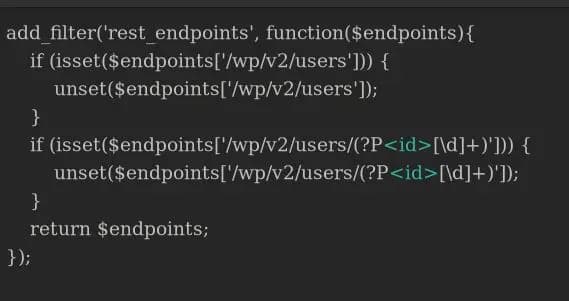
Disabling or restricting user endpoints prevents automated harvesting of usernames.
Protect Author Permalinks
Author archive URLs (/?author=1) are another enumeration vector. You can block numeric author queries using .htaccess:
RewriteEngine On
RewriteCond %{QUERY_STRING} ^author=([0-9]*)
RewriteRule .* - [F]
Alternatively, author slugs can be customized via functions.php.
Normalize Login Error Messages
Default WordPress login errors reveal whether a username exists.
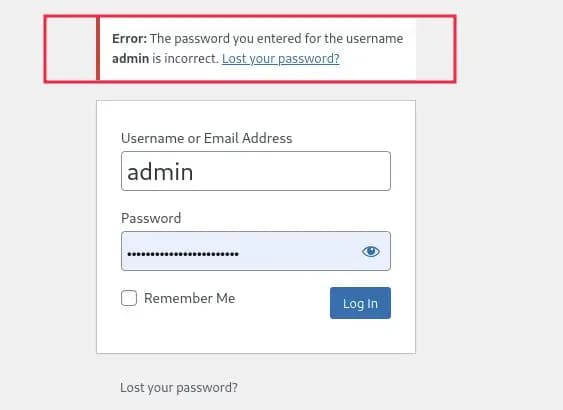
You can mask this behavior:
function login_error() {
    return 'Wrong credentials';
}
add_filter('login_errors', 'login_error');
This removes a valuable signal attackers rely on during brute-force attacks.
Use Strong Password Policies
WordPress does not enforce strong password policies by default. Weak passwords remain one of the most common compromise vectors. Passwords should be long, unique, and randomly generated. Avoid predictable patterns. Use a password manager wherever possible.
Rate-Limit Login Attempts
Blocking or delaying repeated login attempts dramatically increases attack cost.
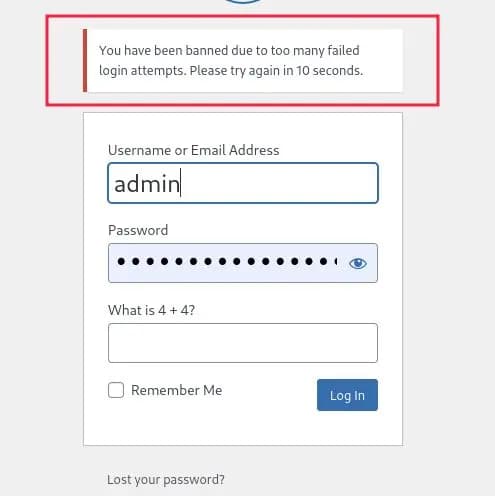
While IP-based blocking is not foolproof due to IP rotation, it remains an effective deterrent when combined with other controls.
Implement CAPTCHA on Authentication Endpoints
Adding CAPTCHA to login and password reset forms helps mitigate automated attacks. This can be achieved via minimal plugins or custom implementation in functions.php. CAPTCHA should be used sparingly and combined with rate limiting.
Enable Two-Factor Authentication (2FA)
Even strong passwords can be compromised. Two-factor authentication prevents account takeover even when credentials are leaked. Recommended plugins include:
- WP 2FA
- Two Factor Authentication
2FA alone eliminates a large class of attacks.
Deploy a Web Application Firewall (WAF)
A WAF blocks malicious requests before they reach WordPress. Options include:
- WordFence (plugin-based)
- Cloudflare (edge-based)
A properly configured WAF protects against common OWASP Top 10 attacks and brute-force campaigns.
Harden File Permissions and Directory Access
Misconfigured file permissions allow attackers to upload or execute malicious files. Best practices include:
- Disable PHP execution in
/uploads - Restrict write permissions
- Protect sensitive directories with server-level rules
This significantly limits post-exploitation impact.
Enforce HTTPS and Secure Headers
Transport security is mandatory. Ensure:
- HTTPS is enforced site-wide
- Secure headers such as CSP, X-Frame-Options, and X-Content-Type-Options are configured
These reduce browser-side exploitation risks.
Perform Regular Security Assessments
The most effective way to secure WordPress is to think like an attacker. Regular penetration testing and security audits help identify vulnerabilities before they are exploited.
Automation alone is insufficient—manual testing remains critical.
Making WordPress Security Simple with Bytium
WordPress hardening often requires deep technical knowledge. Bytium provides structured WordPress security hardening without unnecessary plugins. Our approach includes:
- Full security audits
- Manual hardening via code and configuration
- Optional deployment of a lightweight internal hardening plugin
Internal Hardening Plugin Capabilities
The plugin (not publicly sold) supports:
- Version hiding and feature minimization
- Advanced user enumeration prevention
- Custom login error handling
- CAPTCHA and rate limiting
- Directory protection
- Admin notifications
There is no measurable performance impact.
All configurations are applied automatically.
Custom Engagement Models
Depending on requirements, we offer:
- Full manual hardening with no plugins
- Audit-only engagements with guided remediation
- Custom feature requests
Why stack dozens of plugins when security can be applied systematically? Hardening WordPress correctly reduces risk dramatically and sustainably. Order WordPress Security Hardening before attackers do.